![logo_mice-portal.png]](https://knowledge.miceportal.com/hs-fs/hubfs/website/layout/logo_mice-portal.png?height=40&name=logo_mice-portal.png)
1. Invite new service providers
2. Send inquiry
1. Invite New Service Providers
You can invite a new service provider who is not represented on the MICE Portal to your MICE Portal project in order to receive a quote.
Note: It is possible that you will not find your preferred provider because your filters are too restrictive. Therefore, remove all filters before inviting a provider to submit a quote.
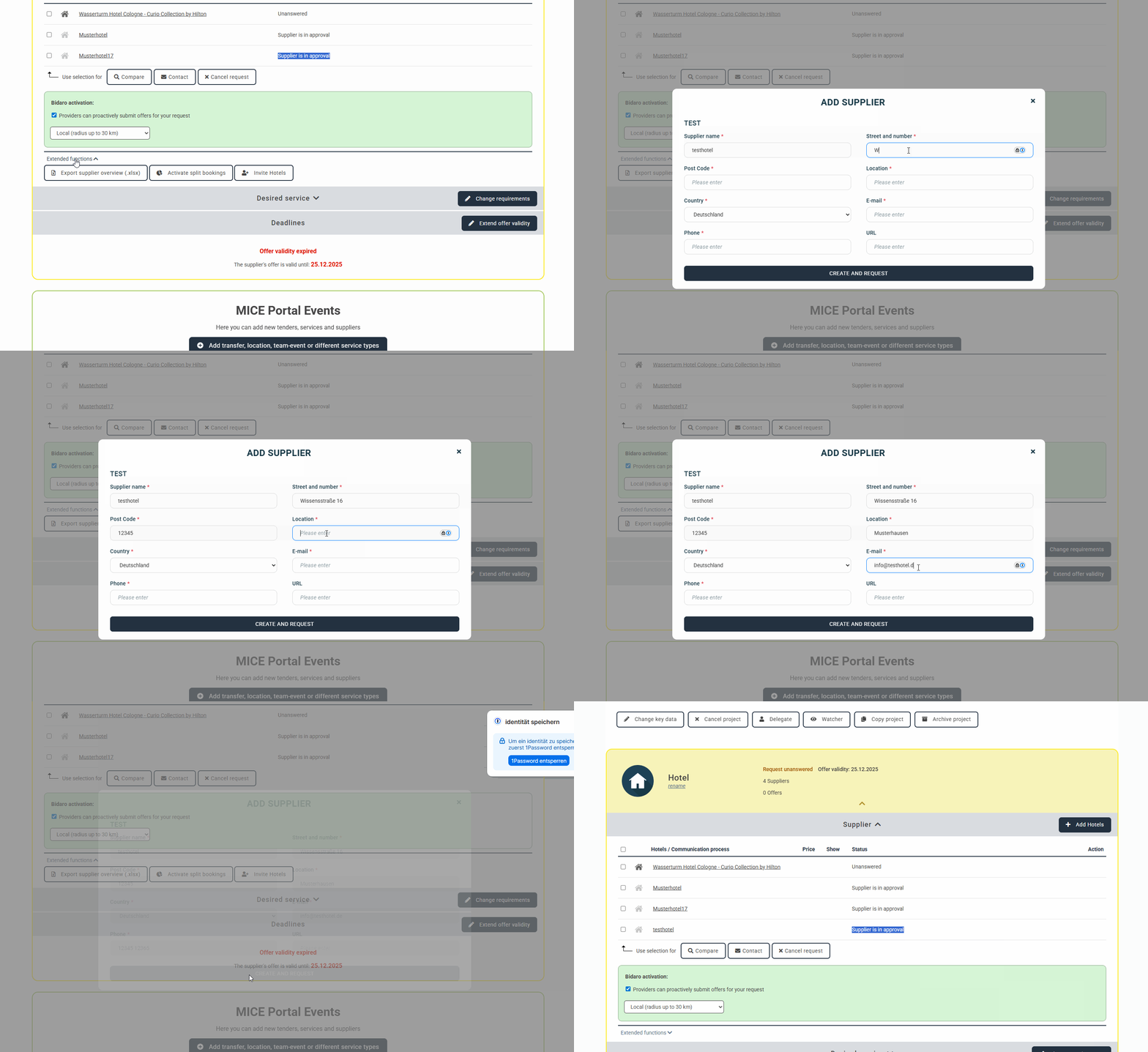
Go to “Extended Functions” in your project and click on “Invite Hotel.” Complete the fields and finish the invitation.
2. Send inquiry
The service provider will be reviewed by our partner management team, approved, and your request will be sent directly to the new service provider.
Tipp: Especially with new service providers, it may take a little longer than usual to prepare a quote. Feel free to contact the provider via the messaging function or by phone to speed up the quote submission process.
Get a head start on trends, new openings, events and news from the industry. With our MICE News you will receive selected and suitable information directly in your mailbox. You can subscribe directly here: https://blog.miceportal.com/