![logo_mice-portal.png]](https://knowledge.miceportal.com/hs-fs/hubfs/website/layout/logo_mice-portal.png?height=40&name=logo_mice-portal.png)
1. What is the booking report?
2. How do I access the report?
3. Key information at a glance
1. What is the booking report?
The booking report provides a complete overviewof all booking activity:
- Update: Every Wednesday at 00:07 AM
- Time period: Data of the last 5 years
- Content:
- All booked offers (Status: „gebucht")
- All cancelled offers (Status: „storniert")
- Projects with end dates up to 5 years back
Important: Test projects not included.
2. How do I access the report?
Navigate to the "Analytics" tab in the MICE Portal. Below that you will find additional tabs such as "KPI Overview", "Savings" and also "Reports" - click on "Reports".
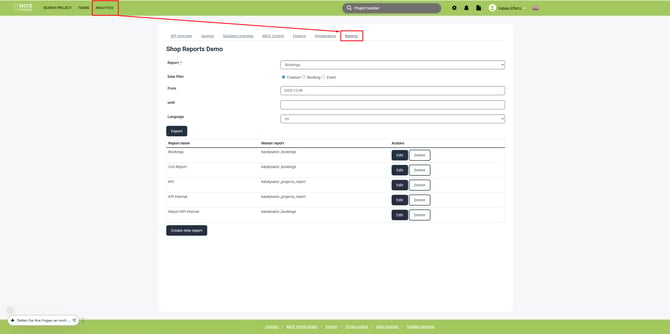
If you don't have access to "Analytics" in the navigation bar, your user group is missing the permission to access it.
3. Die wichtigsten Informationen verstehen
Der Buchungsbericht ist in mehrere Kategorien unterteilt. Hier findest du die Erklärungen zu den wichtigsten Feldern:
Projektinformationen
Diese Grunddaten helfen dir Projekte schnell zu identifizieren:
| Field in report |
Definition | Example |
| Project | Unique project number | 2600000 |
| Title | Title of the project | All hands 2026 |
| Service type | Service type | Hotel, Location, Transfer |
| Status | Project status | active, booked or cancelled |
| Participants Quantity | Count of event participants | 150 |
Finanzielle Übersicht
Alle Beträge werden in Originalwährung und Euro gespeichert:
| Field in report |
Definition |
| Currency | Currency code(EUR, USD, GBP, etc.) |
| Total turnover | Total turnover incl. VAT |
| Total turnover net | Total turnover excl.. VAT |
| Invoice total | Total of all invoices |
| Special tax | Total of all special taxes e.g. "bed tax" |
| Savings total | Total savings |
Our tip: The difference between "Total turnover" and Total turnover net" is VAT.
We recommend using "Total turnover" for budget planning.
Savings in-depth
| Field in report |
Definition |
| Spot Savings | Gained discounts |
| Rate savings | Saving from pre-negotiated prices |
| difference to rate saving | Savings from pre-negotiation rate |
| Operative saving | Operative process saving |
| Won savings | Savings from re-negotiations |
| Lost savings | Savings lost due to booking a higher offer |
| Costs per participant | Average cost per participant |
Important dates
These dates help you analyse the booking process:
| Field in report |
Definition |
| Created on | Project creation date |
| Start date | Event start |
| End date | Event end |
| First offer | Date of first created offer |
| Booking date | Date of booking confirmation |
| Planning time | Time between creation and booking in days |
| First response (minutes) | Response time for supplier |
| Free cancellation date | Last possible free cancellation date |
| Cancellation date | When a booking was cancelled |
Our tip: "Planning time" gives insight in the average time you need from creation to actual booking .This helps for planning of future events.
Supplier information
| Field in report |
Definition |
| Supplier | Name des Hotels/Anbieters |
| City | Standort des Dienstleisters |
| Postcode | Postal code |
| Chain | Hotel chain (if available) |
| Active partner | Framework hotel: Yes/No |
| Contract type | Contracted, Preferred partner oder None |
| Has pre negotiated rates | Pre negotiated rates: Yes/No |
| Certified supplier | Yes/No |
| Average feedback | Average feedback (from bookers) (e.g. 4.5) |
Booking details
| Field in report |
Definition |
| Split booking | Split across multiple suppliers: Yes/No |
| Special offer | Special offer: Yes/No |
| Ordering number | Internal ordering number |
| Payment Settings | Payment settings |
| Cancelled after free cancellation date | Date of cancellation after free cancellation |
| Bidaro | Created via Bidaro: Yes/No |
| Airplus supplier | Air Plus Payment: Yes/Noo |
4. Frequently Asked Questions
How often is the report updated?
Every Wednesday at 00:07 AM. It always contains the most current data on your bookings.
What does "Split booking" mean?
A split booking means that an order has been distributed across multiple suppliers. This can occur, for example, at large events where hotel and conference rooms are provided by different service providers.
What is the difference between Gross and Net?
"Total Turnover" includes value-added tax (Gross), "Total Turnover Net" is the amount without taxes. For your budget planning, the gross value is relevant.
Are test projects recorded?
No, test projects are excluded from the Booking Report to avoid distorting your statistics.
Which Projects are included in the report?
All booked and cancelled projects with end dates from the last 5 years.
What does "Planning Time" mean?
The planning time shows the number of days between project creation and booking date. This metric helps you understand your average lead time.
Get a head start on trends, new openings, events and news from the industry. With our MICE News you will receive selected and suitable information directly in your mailbox. You can subscribe here: https://blog.miceportal.com/