![logo_mice-portal.png]](https://knowledge.miceportal.com/hs-fs/hubfs/website/layout/logo_mice-portal.png?height=40&name=logo_mice-portal.png)
1. What is the negotiation report?
2. How do I access the report?
3. Key information at a glance
1. What is the Negotiation Report?
The Negotiation Report provides the most comprehensive overview of all negotiation activities:
- Update: Every Friday at 4:07 PM
- Time period: Projects with end dates up to 5 years back
- Content:
- All negotiations (inquiries to suppliers)
- All offers, regardless of status
- Booked, rejected and open offers
- Only visible negotiations (not "invisible") Important: Test projects are included and identifiable by the "Test Project" field. Special feature: Unlike the Booking Report, you can see ALL inquiries and offers here, including those that were not booked. This enables a complete analysis of negotiation performance.
Important: Test projects are included and identifiable by the "Test Project" field.
Special feature: Unlike the Booking Report, you can see ALL inquiries and offers here, including those that were not booked. This enables a complete analysis of negotiation performance.
2. How do I access the report?
Navigate to the "Analytics" tab in the MICE Portal. Below that you will find additional tabs such as "KPI Overview", "Savings" and also "Reports" - click on "Reports".
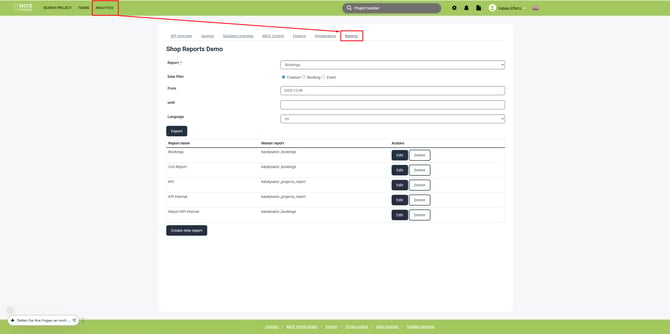
If you don't have access to "Analytics" in the navigation bar, your user group is missing the permission to access it.
3. Key Information at a Glance
The Negotiation Report is divided into several categories. Here you will find explanations of the most important fields:
Project Information
These basic data help you quickly identify projects:
| Field in report | Definition | Example |
| Project | Unique Project number | 2600000 |
| Title | Name of the project | All Hands 2026 |
| Service type | Service type | Hotel, Location, Transfer |
| Status | Projektstatus | active, booked or cancelled |
| Participants Quantity | Count of Participants | 150 |
| Test project | Wether it is a test project | Yes/No |
| Project link | Direct link to project | - |
Our tip: The field "Test project" can help you to differentiate between real and test negotiations.
Negotiation information
These field give you an in-depth scope of the negotiation process:
| Field in report |
Definition |
| Bidaro | Created via Bidaro: Yes/No |
| Negotiation activated at | When the request was sent |
| First contact at | Timestamp of first contact |
| First response (minutes) | Response time from the supplier |
| hivr | HIVR active: Yes/No |
| Commission | Comission agreed: Yes/No |
Our tip: "First response" is an important KPi for quality ofyour suppliers.
Short response times indicate good cooperation.
Financial Overview
Understand the financial aspects of negotiations:
| Field in report |
Definition |
| Currency | Currency code (EUR, USD, GBP, etc.) |
| Total turnover | Total turnover incl. VAT |
| Total net turnover | Total turnover excl. VAT |
| Booked turnover | Turnover of booked offers incl. VAT |
| Booked net turnover | Turnover of booked offers excl. VAT |
| Invoice sum | Total of all invoices |
| Special Tax sum | Sum of special taxes like e.g. "bed tax" |
Important:
- "Total turnover" shows the newest offer, regardless of wether it is booked or not
- "Booked turnover" is only filled on booked offers
Important dates
These dates help you to analyse the planning process:
| Field in report |
Definition |
| Created on | When the project was created |
| Start date | Event start |
| End date | Event end |
| Event date | Date of the event |
| First offer | When the first offer was created |
| Booking date | Date of booking confirmation |
| Validation date | Offer validity until |
| First response (minutes) | Response time of supplier |
| Free cancellation date | Free cancellation available until |
| First Release requested date | Date of the first release request sent |
Supplier information:
| Field in report |
Definition |
| Hotel | Name of hotel / supplioer |
| City | City of supplier |
| Postcode | Postal code |
| Chain | Hotel chain (if available) |
| Active partner | Frame work partner: Yes/No |
| Contract type | Contracted, Preferred partner or None |
| Certified supplier | Certification: Ja/Nein |
| Entertainment package ID | ID of Entertainment package |
People & Company
Who participated in the negotiation?
| Field in report |
Definition |
| Creator | Person who created the project |
| User group | User group of creator |
| Company of the client | Customer company name |
| Invoice-Company of the client | Invoice company |
| Manager | Projektmanager |
| User group manager | Gruppe des Bearbeiters |
| Ort | Firmenstandort |
Offer details
Details on the received offers:
| Field in report |
Definition |
| Special offer | Yes/No |
| Offer comment | Comment in the offer |
| Split booking | Split across multiple suppliers: Yes/No |
| Changed cancellation terms | Cancellation terms changed |
| Depositanforderungen verändert | Deposit terms changed |
| Client comment | Client comment |
| Terms of cancellation | Addition to terms of cancellation |
| Ampellogik Status | Color of the traffic light system |
| Ampellogik reason | Reason for color of traffic light system |
Our tip: "Ampellogik" helps you to identify critial offers quickly (red = Attention, yellow = check, green = okay)
Decline & Cancellation
Understand why offers weren't created:
| Field in report |
Definition |
| Reason for decline | Pre-defined set of decline-reasons |
| Decline reason | Additional text for decline reason |
| Cancellation reasons | Cancellation reason |
Our tip: Analyse decline reasons to identify improvement potential
Rating and invoices
| Field in report |
Definition |
| Offer assessment selection answer | Angebotsbewertung und -vergleich |
| Offer assessment comment | Kommentar zur Bewertung |
| Invoice Address | Name auf der Rechnungsadresse |
| Number of invoices | Anzahl der Rechnungen |
| Invoice state | bezahlt, unbezahlt, nicht gefunden |
| CO<sub>2</sub> compensation in kg | Calculated CO₂ emissions |
4. Frequently Asked Questions
How often is the report updated?
Every Friday at 4:07 PM. It therefore contains the most current negotiation data of the week.
What is the difference to the Booking Report?
The Negotiation Report shows ALL inquiries and offers (booked, rejected, open), while the Booking Report only contains final bookings and cancellations.
What is the difference to the Project Report?
The Project Report shows a project overview, while the Negotiation Report shows detailed information about each individual inquiry and each offer.
What is the difference between "Total Turnover" and "Booked Turnover"?
- "Total Turnover" = Amount of the latest offer (whether booked or not)
- "Booked Turnover" = Only present for actually booked offers
Are test projects included?
Yes, unlike the Booking Report, test projects are included. They can be identified by the "Test Project" field and can be filtered out.
Was bedeutet "Ampellogik Status"?
Die Ampellogik bewertet Angebote automatisch:
- Green: Offer meets expectations
- Yellow: Offer should be reviewed
- Red: Critical deviations
Why are some fields empty?
Some fields (e.g. "Booked Revenue" or "Invoice Amount") are only filled in when the corresponding event has occurred (e.g. booking or invoicing).
Get a head start on trends, new openings, events and news from the industry. With our MICE News you will receive selected and suitable information directly in your mailbox. You can subscribe here: https://blog.miceportal.com/