![logo_mice-portal.png]](https://knowledge.miceportal.com/hs-fs/hubfs/website/layout/logo_mice-portal.png?height=40&name=logo_mice-portal.png)
1. What is the project report?
2. How do I access the report?
3. Key Information at a Glance
1. What is the project report?
The projectreport offers an in-depth overview of all projects:
- Update Frequency: Every Thursday at 00:07 AM
- Zeitraum: Projects with end date from 5 years ago onwards
- Inhalt:
- All Projects (excluding test projects)
- All Tenders (Gewerke) innerhalb der Projekte
- All tenders (service types) within projects
- Status und progress of all all projects
Important: The project report shows ALL projects, not just booked. This allowed in-depth analysis.
2. How do I access the report?
Navigate to tab "Analytics" in MICE Portal.
Here you will find a list of moretabs like "KPI Overview", "Savings" as well as "Reports". Click on "Reports".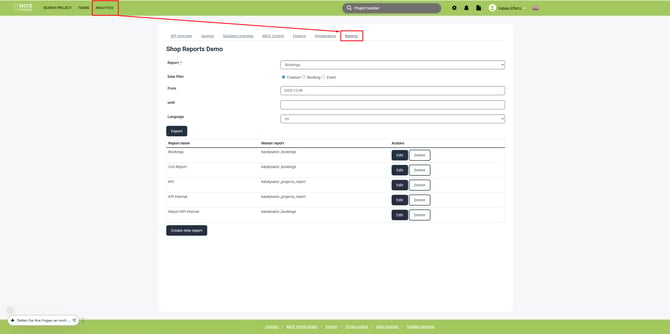
If you don't have access to "Analytics" in the navigation bar, your user group is missing the permission to access it.
3. Key Information at a Glance
The project report is split in multiple categories. Below you will find the most important fields:
Project information
Base-data to identify projects:
| Field in report | Definition | Beispiel |
| Project number | Unique Project number | 2600000 |
| title | Title for project | All-hands 2026 |
| Stauts | Project status | active, booked or cancelled |
| Number of people | Amount of participants | 150 |
| City | City/Location for project | Berlin |
| Project link | Direct link to project | - |
Our tip: With "project number" you have a clear identifier for projects - even if the name occurs multiple times.
Financial Information
Undestand financial aspects of negotiatons:
| Field in report |
Definition |
| Total of authorized offers | Amount of all booked offers |
| Total of cheapest offer | Amount of the cheapest offers |
| Total of most expensive offer | Amount of the most expensive offers |
| Sum lodging | Number of lodging services |
| Sum conference | Number of conference services |
| Invoice sum | Total amount of all invoices |
Our tip: Comparision between "cheapest" and "most expensive" offer shows saving potential saving - or reasons for higher prices (e.g. better service, location).
Important Dates
These dates help you analyse booking behavior:
| Field in report |
Definition |
| Created on | When the project was created |
| Start date | Event start date |
| End date | Event end date |
| First offer | When the first offer was created |
| First booking created at | When the first booking was created |
| Booking date | Date of booking confirmation |
| Cancellation date | When the project was cancelled |
| Free cancellation date | Free cancellation possible until |
| Offer validity | Offer valid until this date |
Supplier information:
| Field in report | Definition |
| Hotel | Name of the hotel/provider |
| City | City of the supplier |
| Postcode | Postal code |
| Country | Country of the supplier |
| Chain | Hotel chain (if applicable) |
| Active partner | Framework agreement hotel: Yes/No |
| Contract state | Contracted, Preferred partner oder None |
| Has pre negotiated rates | Pre-negotiated rates: Yes/No |
| Certified supplier | Certification available: Yes/No |
| Foreign suppliers | Suppliers abroad: Yes/No |
People & Companies
Who participated in the negotiation?
| Field in report |
Definition |
| Creator | Person who created the project |
| Creator E-Mail | Email address of the creator |
| User group | Creator's user group |
| Creator company | Company of the creator |
| Company | Company of the project |
| Manager | Project manager |
| Manager E-Mail | Email of the project manager |
| Company city | City of the company |
Contract state verstehen
| Field in report |
Definition |
| Contract state | Yes = framework No = free market Partially= mixed unknown = status not defined |
Our tip: Contract state allowed you to check wether you took advantage of pre-negotiated rated or if offers came from the free market.
Invoice & Cancellation
| Field in report |
Definition |
| Invoice Address | Name on invoice address |
| Number of invoices | Count of invoices |
| Invoice state | paid, unpaid, not found |
| Cancellation | Reason for cancellation |
| Deposit terms | Deposit requirements |
Our tip: Analyising the cancellation reason helps to identify improvement potential.
4. Frequently Asked Questions
How often is the report updated?
Every Thursday at 00:07 AM.
Which projects are included?
All projects with end date from 5 years ago onwards, except trial projects.
What does contract state mean?
Shows whether offers come from framework agreement partners (Yes), free market (No), or mixed (Partially).
Get a head start on trends, new openings, events and news from the industry. With our MICE News you will receive selected and suitable information directly in your mailbox. You can subscribe here: https://blog.miceportal.com/